
4K Blu-ray Players for Movie Lovers
As an Amazon Associate, I earn from qualifying purchases.
If you want the best-looking movies at home (and the most reliable Dolby Atmos/DTS:X soundtracks), a dedicated 4K UHD Blu-ray player is still the move. The big separator isn’t “4K” — it’s HDR format support (Dolby Vision vs HDR10+) and how well the player handles tone-mapping/upscaling.
How I researched
I compared recent expert roundups and deep-dive reviews, prioritized HDR format support (because it most directly affects what your TV can display), checked disc/audio format compatibility, noted stock/availability quirks, and weighed long-term ownership basics like connections and usability.
Top picks
Panasonic DP-UB820-K — Best for most people
One-sentence summary: The “safe pick” for serious movie nights because it covers both Dolby Vision and HDR10+ and is widely recommended for its picture processing.
Why it wins: Broad HDR compatibility + Panasonic’s tone-mapping tools (useful if your TV/projector isn’t super bright).
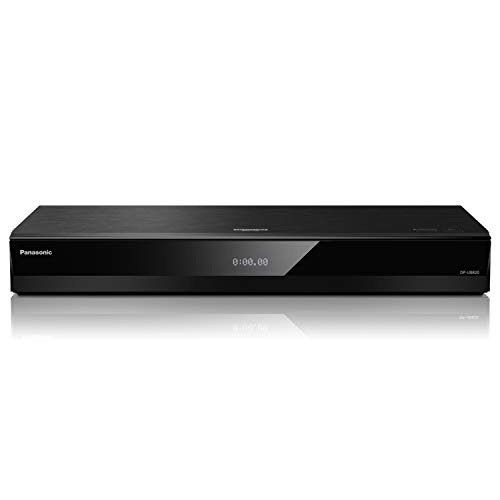
- Premium 4K Ultra HD Blu-Ray Player for Spectacular Home Theater Experience: Enjoy your Blu Ray, rare DVDs, or streamed content on this 4K player in cinematic style with immersive video and audio; operating temperature range: +5°C to +35°C (+41°F to +95°F)
- Rooted in Japan’s legacy of sound mastery and commitment to ongoing innovation, Panasonic audio and entertainment products, like these 4K DVD players for TV, create an immersive, high-fidelity experience that elevates media
- Studio Master Sound with Enhanced Clarity: This 4k UHD Blu ray player, designed for high-resolution audio as it was meant to be heard, connects to your audio system via twin HDMI for Hi-Res studio master sound while you watch movies and more
Pros
- Dolby Vision + HDR10+ support (wide disc compatibility)
- Strong upscaling for Blu-ray/DVD
- Good connectivity (often includes dual HDMI on this class)
Cons
- Can go in/out of stock at times
- Menus/apps aren’t the main reason to buy
Trade-offs / who should skip: If your TV doesn’t do Dolby Vision and you don’t care about HDR10+, a cheaper HDR10/HDR10+ player can make more sense.
Scores: Performance 4.5/5 • HDR format support 5/5 • Ease of use 4/5 • Value 4/5
Sony UBP-X700U — Best for small setups (Dolby Vision on a budget)
One-sentence summary: Compact, capable, and a common cheaper way into Dolby Vision 4K discs.
Why it wins: If you just want Dolby Vision + solid 4K playback in a small box, it’s hard to beat.

- See the unrivalled visual clarity of 4K Ultra HD Blu-ray
- Play almost any disc and file format including DVDs
- Stunning picture with 4K upscaling up to 60p
Pros
- Dolby Vision support
- Small footprint (easy to fit in tight media cabinets)
- Usually priced and positioned as an entry-level dedicated player
Cons
- Dolby Vision may require manual on/off toggling per disc
- No HDR10+ (if you’re chasing that format)
Trade-offs / who should skip: If you want “set-and-forget” Dolby Vision behavior, Panasonic’s midrange options are often less fiddly.
Scores: Performance 4/5 • HDR format support 3/5 • Ease of use 3/5 • Value 4.5/5
Sony UBP-X800M2 — Best for disc collectors (SACD + sturdier build)
One-sentence summary: A more “enthusiast-feeling” Sony with broad disc support (including SACD) and excellent picture, but it can share the Dolby Vision toggling annoyance.
Why it wins: If you care about disc versatility (especially SACD) and want a sturdier chassis than entry Sony models.

- Bring the theater home: See the unrivaled visual clarity and detail of 4K UHD Blu-ray while watching your favorite content from the comfort of home
- Smart Functionality: With fast, stable built-in Wi-Fi, you can wirelessly access your favorite streaming apps and services including Netflix, YouTube, Amazon Prime & various others.
- Features Dolby Vision and HDR10 for incredible viewing detail and accuracy and DSEE HX
Pros
- Plays a wide range of disc formats including SACD
- Strong 4K picture + upscaling
- Solid, “premium” physical design vs cheaper decks
Cons
- Dolby Vision can require manual switching per disc
- No HDR10+
Trade-offs / who should skip: If HDR10+ matters (Samsung TV owners especially), go Panasonic.
Scores: Performance 4.5/5 • HDR format support 3/5 • Ease of use 3.5/5 • Value 3.5/5
Panasonic DP-UB154P-K — Best budget “disc-only” Panasonic (HDR10+ focused)
One-sentence summary: A stripped-back Panasonic that focuses on playing discs well (good HDR10/HDR10+), while skipping Dolby Vision and Wi-Fi apps.
Why it wins: If you want Panasonic-style disc playback and you don’t need Dolby Vision or streaming apps.

- Panasonic DVD Player that Supports Multiple HDR Formats: Blu ray DVD player enables high dynamic range playback of three 4K/HDR formats - HDR10 plus, HDR10, and Hybrid Log-Gamma (HLG), providing detailed 4K content
- Complete Your Home Theater with a DVD Blu Ray Player: The Panasonic Blu-Ray Player provides you with a cinematic theater experience in the comfort of your own home
- 4K Ultra HD Blu Ray Player to Enjoy Your Favorite Movies: Enjoy your collection of special-edition Blu Ray, rare DVDs, and all-time favorites in high-quality playback with this 4K DVD player
Pros
- HDR10+ support (plus HDR10/HLG)
- Dolby Atmos + DTS:X bitstream support (disc audio)
- Simple “disc-first” setup (less feature clutter)
Cons
- No Dolby Vision
- No Wi-Fi streaming apps
Trade-offs / who should skip: If your TV supports Dolby Vision and you buy lots of Dolby Vision discs, you’ll miss it.
Scores: Performance 4/5 • HDR format support 3.5/5 • Ease of use 4/5 • Value 4.5/5
Panasonic DP-UB9000P1K — Best premium pick (build + analog audio outputs)
One-sentence summary: Panasonic’s flagship-style deck for people who want a tank-like build and more serious audio connectivity, while keeping full HDR support.
Why it wins: Reference-class build + expanded audio output options (including balanced XLR) for high-end systems.

- Reference-Class 4k UHD Blu Ray Player with High Dynamic Range Playback for the Ultimate Home Theater Experience: Enjoy your library of Blu Ray, DVDs, or streamed content with theater-quality video and audio Power supply: AC 120 V 60 Hz.
- Cinema-Worthy: HCX (Hollywood Cinema Experience) processor renders nuanced colors and detailed images in High Dynamic Range playback; this Panasonic 4K Blu Ray player supports four 4K/HDR formats: HDR10+, HDR10, Dolby Vision & Hybrid Log-Gamma (HLG)
- Analog Audio Circuits: High-performance D/A converter with a balanced XLR, with dedicated audio power supply; this Blu Ray DVD player features an alumite-treated aluminum chassis with high rigidity and a lower center of gravity to reduce vibration
Pros
- Supports HDR10+ and Dolby Vision
- Premium chassis and higher-end audio connectivity (incl. XLR)
- Great choice when you’re building a “forever” disc setup
Cons
- Overkill if you use HDMI audio only
- Bigger/heavier than budget decks
Trade-offs / who should skip: If you’re not using analog outputs (or don’t care about the premium build), the UB820 usually gets you most of the “picture” for less complexity.
Scores: Performance 5/5 • HDR format support 5/5 • Ease of use 4/5 • Value 3/5
Quick compare
- Want the easiest “covers everything HDR” pick: Panasonic DP-UB820-K
- Want Dolby Vision on a tighter budget: Sony UBP-X700U
- Want SACD and broad disc support: Sony UBP-X800M2
- Want HDR10+ without paying for Dolby Vision: Panasonic DP-UB154P-K
- Want the premium Panasonic “flagship” experience: Panasonic DP-UB9000P1K
Buying guide
1) Match the player to your TV’s HDR
- Dolby Vision TV (LG/Sony/etc.) + you buy DV discs: prioritize a player with Dolby Vision (UB820 / X700U / X800M2 / UB9000).
- HDR10+ TV (many Samsung sets) or you want HDR10+ discs covered: prioritize HDR10+ (UB820 / UB154 / UB9000).
2) Decide if you care about “set-and-forget” Dolby Vision
Some Sony models can require manual Dolby Vision switching depending on the disc. If that sounds annoying, lean Panasonic.
3) Audio hookups: HDMI-only vs analog
- If your receiver/soundbar takes audio over HDMI, most players are fine.
- If you want analog outs / XLR for a more specialized setup, that’s where the UB9000P1K stands out.
4) Skip player “streaming apps” as a decision factor
Built-in apps are rarely the reason these players shine; most people are better off using a dedicated streamer/TV apps and treating the player as disc-first.
FAQs
Do I need a dedicated 4K Blu-ray player if I have a PS5/Xbox?
If you mainly want discs to “work,” a console can do the job. If you want better HDR handling and disc-first stability/features, a dedicated player is usually the upgrade.
What’s the single biggest mistake people make?
Buying a player that doesn’t match their HDR needs (e.g., Dolby Vision TV + no DV player, or wanting HDR10+ coverage but buying a DV-only model).
Are 4K UHD discs region-locked?
Most 4K UHD Blu-ray discs are region-free, but standard Blu-ray and DVD region coding can still matter depending on the disc and player.
As an Amazon Associate, I earn from qualifying purchases.